
 Test Image Creation with Different AI Models
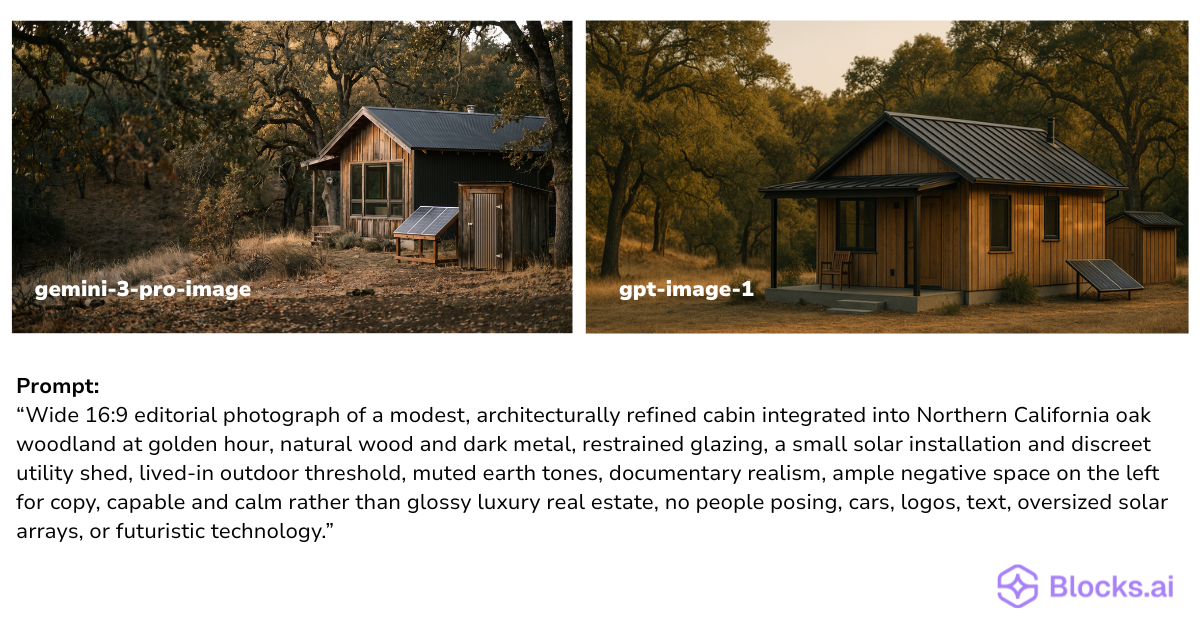
Ask two different AI image models to illustrate the same idea, and you will often get surprisingly different results. One might nail the lighting but drift from your brief. Another might follow your instructions more faithfully but look less realistic. The only way to know which model fits your use case is to run the same prompt through several of them and compare what comes back.
This guide shows how to build an AI agent that does exactly that. You describe what you want, and the agent sends that brief to ChatGPT and Google image engines. It then returns each model’s output so you can judge them side by side.
Want the full recipe? Here is the reusable guide you can use to build an agent like this yourself:
You can also try a finished version for yourself here:
https://frame-image-studio.netlify.app/
What You Are Building
You are building an AI image agent that turns a text description into a photo-realistic image — and can run the same description through more than one image model at a time so you can compare them.
You give it a creative brief (what the image should show, the shape you need, and optionally a reference photo for style or composition). The agent handles the rest: it sharpens your description into a photographic prompt, sends it to the image engines you choose, and returns each model’s result as a separate image you can save or share.
Once built, the agent has the following components:
- A core engine that connects to image models from Google and OpenAI, so the same brief can be rendered by either one or both
- A deployment on Railway so the agent stays live around the clock (instead of only running on your laptop)
- A listing on the Blocks.ai network so teammates can use it without needing their own provider API keys
What the Guide Gives You
The linked guide is a complete, repeatable recipe. It hands an AI builder everything it needs to stand up your image comparison agent: how to wire up both image providers, publish the agent so others can use it, and confirm it works with a real creative brief.
It also flags the easy-to-miss details — like keeping API keys on the server instead of sharing them with every user, choosing which engine runs by default, and making sure updates actually go live after you make a change.
Starter Prompt
Want to build your own version or adapt it for a different set of models? Paste this into an AI builder and fill in the blanks:
Use this guide to build a multi-engine text-to-image agent:

https://raw.githubusercontent.com/CagedEther/agentic-business-schooled/refs/heads/main/blocks-dual-engine-image-agent-skill.md

Goal:
Build an AI agent that generates photo-realistic images from a text description and can compare output across [IMAGE MODELS — e.g. Google Gemini and OpenAI].

Inputs:
- A text description of the image: [EXAMPLE BRIEF]
- Optional reference image for style or composition: [PATH OR NONE]
- Which engine(s) to run: [google, openai, or both]
- Aspect ratio: [portrait, landscape, wide, or square]

Please read the guide, set up the agent, deploy it, publish it on Blocks, and run one test image to confirm it works.
What a Good Result Looks Like
A good result is a working image agent, not just a prompt. It stays online, accepts a plain-language brief, and returns one or two images you can open and compare immediately.
When you run the same description through both engines, the images should be recognizably answering the same brief, but visibly different in style, realism, composition, or how closely they followed your instructions. That difference is the point. You are not looking for one “correct” image; you are learning which model behaves the way you need for your kind of work.
What to Try Next
Run the same brief across a few different use cases, such as a product shot, a landscape, a person in a setting, and note which model wins for each. Try adding a reference image and see how each engine interprets it. Or build a simple front end (like the Frame Image Studio demo) so non-technical teammates can run comparisons without touching the command line.